A missed BIOS configuration affected every workstation in a 130-computer emergency-room deployment. The devices could not be released as configured, but the department still needed to become operational.
EXPERIENCE & HANDS-ON WORK
The depth behind the résumé bullets.
These sections show the situation, what I was responsible for, the work I completed, the result, and what each story demonstrates to an employer.
WELLSPAN HEALTH · IT TECHNICIAN
Emergency-room endpoint recovery
130 affected systems~100 replacements4–6 imaged at onceSame day recovery
Help restore enough working systems quickly while keeping imaging, BitLocker, asset assignments, permanent labels, and final validation accurate.
- Helped isolate the firmware configuration as the root cause instead of treating the problem as a normal Windows failure.
- Separated systems that could be corrected quickly from devices requiring a longer rebuild.
- Prepared approximately 100 replacement workstations from another department and configured them for emergency-room use.
- Used a KVM switch to prepare four to six systems simultaneously.
- Organized imaging, software, updates, labeling, encryption checks, testing, and staging as a structured parallel workflow.
- Helped coordinate the physical swap while the original systems were corrected.
The emergency room received working systems within hours that same day. The department did not have to wait for all 130 original computers to be repaired sequentially, and encryption and inventory controls were still validated before release.
HEALTHCARE ENDPOINT OPERATIONS
Deployment and support across three hospital buildings
1,000+ endpoints validated300+ patched75–100 deployments/week~100 badge setups
Endpoint lifecycle
- Windows imaging and driver validation
- MECM software and security updates
- Manual Group Policy refreshes
- BitLocker verification
- Asset tags and permanent metal labels
- Final user and peripheral testing
Clinical and office support
- Printers, queues, mappings, and drivers
- Copiers and scan workflows
- Badge and barcode scanners
- Webcams and microphones
- Windows startup and performance
- Endpoint and network communication
Security operations exposure
- Foundational Splunk training
- Five to six alerts reviewed per shift
- Time filtering, graphs, and timelines
- Phishing and failed-login scoping
- VirusTotal and AbuseIPDB context
- User validation and escalation
BLOOMSBURG UNIVERSITY · TECHNOLOGY LEAD
Support, rooms, accounts, imaging, events, and technician training
200+ staff supported50+ rooms500+ policy updates650+ systems reset
People and accounts
- Level 1 and Level 2 support
- 10–20 Active Directory resets or unlocks per week
- Identity verification before restoring access
- Network-drive access troubleshooting
- ServiceNow escalation and handoff notes
- Trained six to eight new technicians
Rooms and events
- 50+ conference rooms
- 50+ high-profile university events
- Projectors and interactive boards
- PC-integrated audiovisual racks
- Wireless presentation systems
- Live troubleshooting during events
Systems and infrastructure
- Group Policy updates on 500+ systems
- Approximately 650 systems reset or reimaged
- 300+ systems prepared for student resale
- Audiovisual, Ethernet, power, and rack cabling
- Two switch installations during renovation
- Web-filter rules for 100+ domains
2021 UNIVERSITY BUILDING RENOVATION
Rebuilding classroom connectivity, audiovisual systems, and room infrastructure
2021 renovationAV + Ethernet rerouted2 switches installedFlexible room layouts
A major university building renovation changed the physical layout of classrooms and conference spaces. Existing Ethernet, audiovisual, power, projector, display, and control connections had to be rerouted so the renovated rooms could support both normal instruction and rooms that could be divided or combined for larger events.
Support the technology side of the renovation by tracing old connections, extending and rerouting cabling, assisting with switch replacement and installation, rebuilding room connections, and validating that instructors and event staff could use the finished spaces reliably.
- Traced existing Ethernet, audiovisual, power, projector, display, and room-control connections before equipment was moved.
- Rerouted and extended Ethernet runs and audiovisual cabling through the renovated spaces, including the bundled connections that linked podiums, racks, displays, and room-control equipment.
- Helped install two network switches used to separate and reconnect room technology during the renovation.
- Reconnected projectors, interactive displays, podium computers, audiovisual racks, microphones, presentation systems, and room-control equipment.
- Supported rooms designed to operate independently or combine into a larger space by checking both configurations.
- Labeled connections and tested network access, display output, audio, presentation switching, peripheral communication, and room controls after installation.
- Documented problems and escalated configuration work that required full-time network or audiovisual administrators.
The renovated rooms reopened with working network and audiovisual connectivity and could support their intended split-room and combined-room layouts. The work reduced post-renovation failures by validating each connection and workflow before staff and scheduled events depended on the spaces.
ACTIVE DIRECTORY & ACCESS ADMINISTRATION
Restoring user access while protecting account permissions
10–20 requests/weekStudents supportedTech staff permissionsVerified access
Students and university technology employees regularly lost access because of forgotten passwords, expired credentials, account lockouts, or missing permissions. These issues interrupted classes, support work, shared-drive access, and the ability of technicians to complete assigned tasks.
Resolve routine identity and access requests quickly without granting unnecessary access, verify the person requesting assistance, and document or escalate cases involving unusual permissions or backend account problems.
- Handled approximately 10–20 password resets and account unlocks per week through Active Directory and established university support procedures.
- Supported both student accounts and technology-employee accounts, adjusting the troubleshooting and verification steps based on the account type.
- Verified the user before resetting a password or restoring access and confirmed whether the account was disabled, locked, expired, or affected by another sign-in issue.
- Granted or updated approved permissions for technology employees when their responsibilities required access to support resources, systems, or shared locations.
- Troubleshot mapped drives and resource-access problems to distinguish credential issues from missing group membership, device problems, or backend service failures.
- Forced Group Policy updates when newly approved settings or access changes had not yet reached older workstations.
- Validated successful sign-in and required resource access with the user, then recorded the work or escalated anything outside the authorized support scope.
Users regained access with less interruption to classes and technology operations, while permission changes remained tied to approved job needs. The process balanced speed with identity verification, least-privilege thinking, validation, and clear escalation.
UNIVERSITY CONTINUITY RESPONSE
Keeping scheduled events operational during a building outage
~10 mobile cartsBackup hotspotsUPS supportEvents continued
A major building outage removed access to normal technology and network services while scheduled events still required presentation and Internet capability.
Create a temporary setup that did not depend on the failed infrastructure and could be tested before attendees arrived.
- Deployed approximately ten mobile workstation and projector carts.
- Used isolated wireless connections and backup hotspots.
- Used uninterruptible power supplies where continuity was needed.
- Tested displays, presentations, and Internet access in advance.
- Stayed available during the event for live troubleshooting.
Scheduled events remained operational. The temporary environment was isolated from the failed building infrastructure and validated before users relied on it.
BREAK/FIX & SETUP LIBRARY
The practical support work behind the larger numbers.
Click a category to see the common symptoms, checks, fixes, and validation steps.
Windows endpoints and deployment
Common work
Imaging, operating-system setup, drivers, software, updates, BitLocker, asset assignment, replacements, storage wipes, and redeployment.
ValidationBoot, user sign-in, network access, device manager, required applications, encryption state, labels, and inventory records.
Printers, copiers, and scanning
Common checks
Power, network reachability, queue state, correct mapping, default device, driver, spooler, paper path, permissions, and scan destination.
ValidationTest page, application print, duplex or tray behavior, scan delivery, and user confirmation.
Accounts and access
Common work
Active Directory resets, lockouts, identity checks, network drives, Microsoft 365 access, and escalation when permissions or backend systems required an administrator.
ValidationSuccessful sign-in, required resource access, password-change behavior, and documented handoff.
Badge, barcode, and office peripherals
Common work
Badge readers, barcode scanners, webcams, microphones, USB devices, clinical peripherals, firmware or driver checks, port changes, and replacement testing.
ValidationApplication recognition, repeated scan or sign-in, correct device assignment, and workflow test with the user.
Conference rooms and audiovisual systems
Common work
Projectors, displays, wireless presentation, audiovisual racks, microphones, source selection, cabling, room-combine modes, and live-event support.
ValidationEvery source, display, audio path, presentation mode, network connection, and backup plan before the room is released.
Basic networking and connectivity
Common checks
Physical link, cable, switch port, IP address, gateway, DNS, Wi-Fi association, network drive, endpoint communication, and whether the problem follows the device or location.
ValidationLocal and remote reachability, name resolution, required service access, and repeat test after restart.
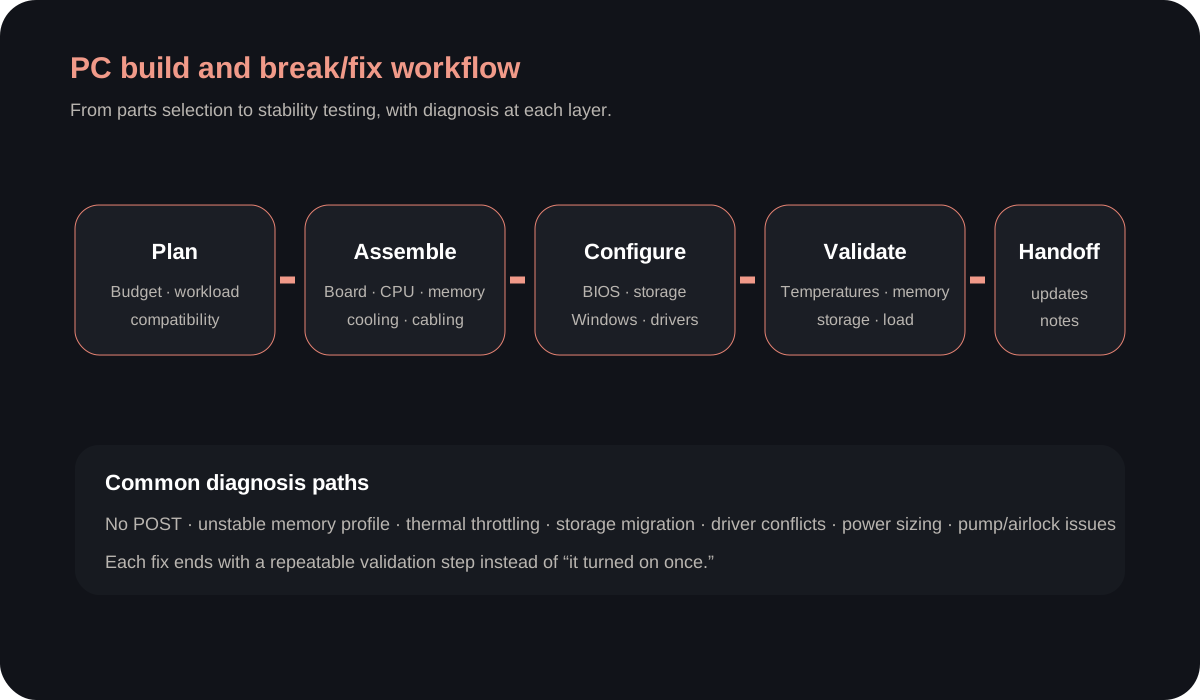
CUSTOM PC BUILD LIBRARY
Representative build types I have assembled, upgraded, or troubleshot.
These are realistic component combinations based on the kinds of systems I have worked on. They are presented as representative configurations, not as a claim that every exact part list was one separate customer build.
Entry gaming build
- Ryzen 5 5600-class processor
- Radeon RX 6600-class graphics
- B550 motherboard
- 16 GB DDR4 memory
- 1 TB NVMe storage
- 650 W Bronze power supply
Focus: value, airflow, BIOS updates, memory profile, and clean Windows setup.
Midrange gaming build
- Ryzen 5 7600-class processor
- Radeon RX 7700 XT-class graphics
- B650 motherboard
- 32 GB DDR5 memory
- 1–2 TB NVMe storage
- 750 W Gold power supply
Focus: platform compatibility, fan curves, cable management, and load testing.
Gaming and productivity build
- Core i5-13600K-class processor
- RTX 4060 Ti-class graphics
- Z690 or Z790 motherboard
- 32 GB DDR5 memory
- 2 TB NVMe storage
- 750 W Gold power supply
Focus: firmware, power limits, thermals, drivers, and stability under mixed workloads.
Compact Mini-ITX build
- Ryzen 5 7600-class processor
- RTX 4060-class graphics
- B650I motherboard
- 32 GB DDR5 memory
- 1 TB NVMe storage
- 650 W SFX power supply
Focus: physical clearances, riser cables, airflow direction, and temperature testing.
Water-cooled performance build
- Ryzen 7 5800X-class processor
- RTX 3080-class graphics
- CPU and GPU water blocks
- Pump/reservoir combination
- 360 mm radiator and multiple fans
- Leak testing before power-on
Focus: loop planning, fittings, draining, air removal, pump behavior, and thermal validation.
Existing-system refresh
- Memory capacity or speed upgrade
- SATA-to-NVMe migration
- Graphics-card and power-supply change
- BIOS update for CPU support
- Windows repair or clean installation
- Driver and stability validation
Focus: preserving data, compatibility, no-POST diagnosis, and proving the upgrade is stable.
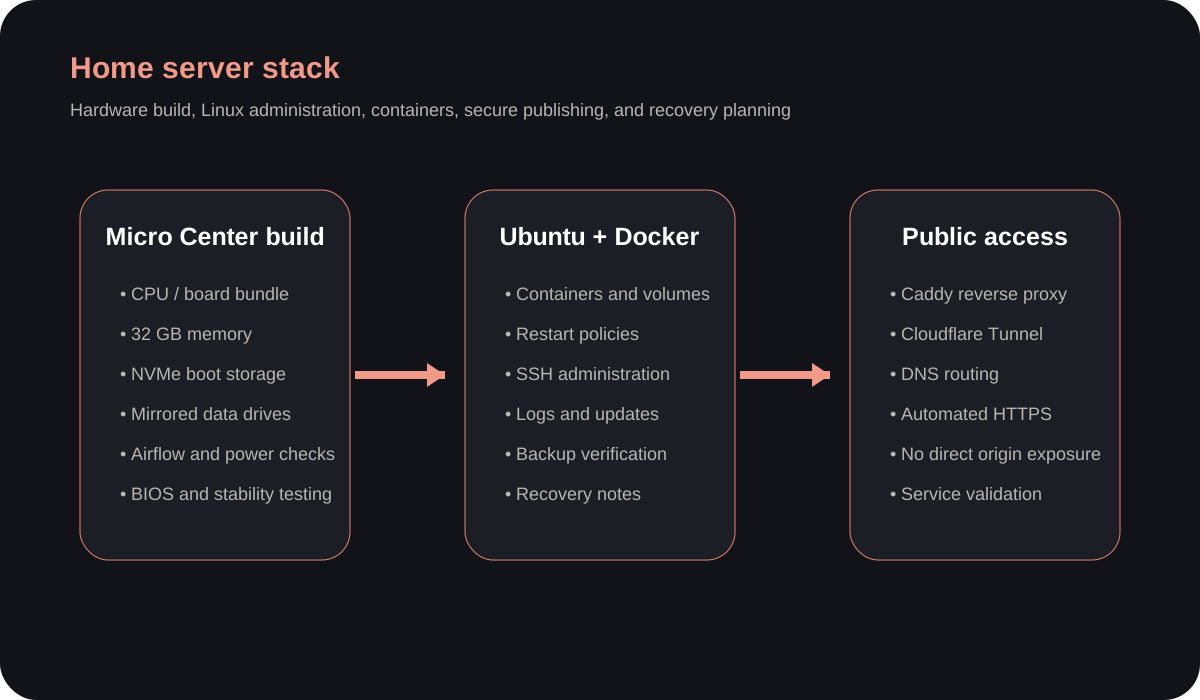
HOME SERVER FROM THE HARDWARE UP
Hardware build, Ubuntu administration, Docker, reverse proxy, tunnel, and recovery.
I used the same build discipline as a custom PC: choose compatible parts, assemble and test the hardware, configure firmware, install the operating system, then layer services on top.
Hardware
- Micro Center CPU and motherboard bundle planning
- Memory and storage compatibility
- NVMe boot device and data drives
- Power and airflow checks
- BIOS configuration and burn-in
- Drive-health and memory tests
Operating system and services
- Ubuntu installation and updates
- SSH administration
- Docker containers and networks
- Persistent volumes
- Restart policies
- Logs, backups, and recovery notes
Secure publishing
- Caddy reverse proxy
- Cloudflare Tunnel
- DNS routing
- Automated HTTPS
- No unnecessary inbound port exposure
- Reboot and remote-access validation